Google Workspace for Education tools allow us to create content, and manage collaboration, communication, and assessment with one fluid set of tools that many students are familiar with. While all students and faculty have access to the Microsoft Office suite of word processing tools, the GSuite is really well equipped with collaborative projects, workshopping, and group work in mind.
Access Google Apps
It’s easy to access your Google Workspace Apps from the MyCampus portal Launchpad or from within any Google App.
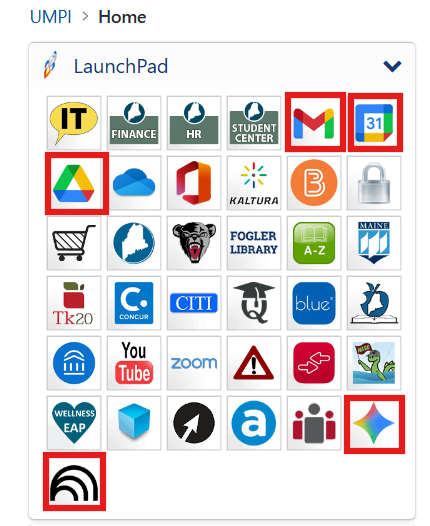
You and your students will find Gmail, Google Calendar, and Google Drive right at the top of the Launchpad. New additions at the bottom of the Launchpad include Google Gemini and Google NotebookLM, two of the Google AI apps.
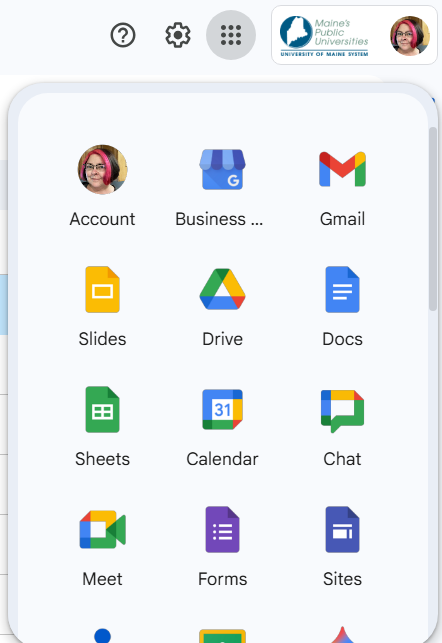
You can find even more Google Apps when you click the Waffle at the top right of the page on any Google App. You will find Account, Business, Gmail, Slides, Drive, Docs, Sheets, Calendar, Chat, Meet, Forms, Sites, Contacts, Classroom, and Gemini. Scroll down to find even more Google apps like Groups, YouTube, Maps, News, Photo, Vault, Keep, Cloud Search, Earth, and more! Each Google App is supported by UMS IT and provides you and your students with data privacy.
Learn more about some of the Google Apps below.
Google in Brightspace
Are you looking for a way to easily access Gmail, your Google calendar and Drive from any Brightspace class at UMPI? Follow this easy step to set up your Brightspace courses for easy access to Google Tools!
Did you know that you can dynamically link to your Drive Docs, Slides, Sheets, and more from anywhere in the Brightspace platform, where the Rich Content Editor is available, using the Insert Quicklink option? Not only that, but you can embed your Drive content directly into your content areas, or group/collaborative workspaces with ease!